Unknown's avatar

About Salvatore Pellitteri

I live in Italy. I'm Microsoft Integration Architect and Developer Team Manager at Microsys. I deal with application systems integration projects using BizTalk Server and business intelligence projects using the SQL Server platform. I have been working on Microsoft's cloud technologies such as Azure Logic Apps, Azure Data Factory, Service Bus and other related technologies for several years. I work in many big integration project with several Italian enterprise organizations integrating many application systems like SAP, Oracle, SQL Server, Salesforce, Microsoft Dynamics, AS400, J.D. Edwards, EDI and HL7. I have been Microsoft MVP Azure for 3 years.

Transcoding operations with BizTalk Server

Many integration processes include transcoding data activities. BizTalk Server provides several ways to do this and often this can be confusing.

First of all, we begin to understand some basic things. Where to put the data? Where to implement the logic?

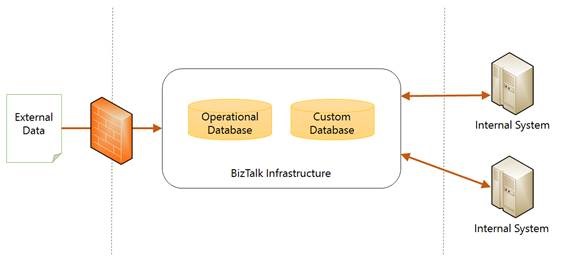
The following figure shows a typical integration scenario, which involves the transcoding operations.

clip_image002

The data come from an external system and include proprietary codes that need to be resolved with as many codes present on internal systems.

Then there is the BizTalk infrastructure with its services and operational databases. Optionally, you can use a custom database to support the integration flows (I do often). Finally there are the internal systems with their interfaces and different logical.

That said, where we put the data? Inside the maps? Inside custom assemblies? Inside the custom database? Do we retrieve them from internal systems?

Well, we begin to exclude what should be avoided, that is inside the maps or inside the assembly. So we evaluate whether using the custom database or calling internal systems.

From my point of view, when it is possible, it is best to delegate to the internal systems. This because internal system has staff trained to manage data and probably also the interfaces that they know. Obviously if it isn’t possible, I prefer to put them in a custom database.

Well, but now, where can I put the transcoding logic? Should I make calls inside the orchestration? Can I use the maps? You can imagine many solutions.

I usually use two approaches depending on whether the transaction involves a single instance of the message or if I have to deal with a massive batch of data and multiple transcoding operations.

When I elaborate a single entity, I like to do this transcoding within the maps using a lookup component.

Otherwise, when I’m working on a big batch of data and there are many transcoding operations, I use the custom database.

Transcoding operations inside the maps

In the event that you are working on a single instance of the message, resolve transcoding within the maps is very elegant because it is possible to handle errors, keep the process simple and clear and, at the same time, reduces the number of transformations that otherwise we should implement inside the orchestration.

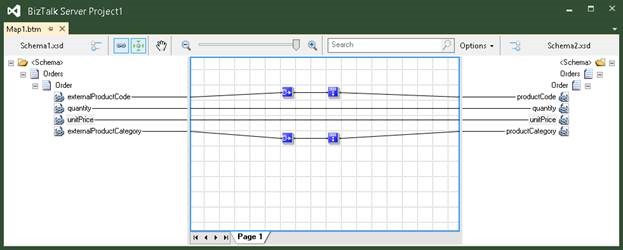
The point is that whoever solves the transcoding is almost always a service (which can be a call to a database or to a web service). If the service consist of a call to a Database, you can use the Database Lookup functoid as shown in the following figure:

clip_image004

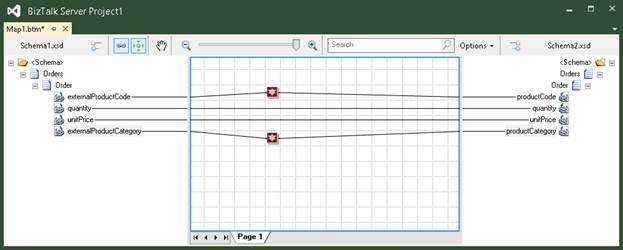
If instead it is a web service, or the logic to access the database is more complex, you can develop a custom functoid that implements the data access logic of the database or of the web service, obtaining a result as shown below.

clip_image006

For additional information about how to writing custom functoid refer the following address http://msdn.microsoft.com/en-us/library/aa560879.aspx.

Using a custom database

If the amount of data is large and the rules of processing and transcoding are numerous and complex I like to use a custom database.

The integration flow is as follows:

1. Data from external sources are loaded in a table.

2. Then I call a procedure that returns the data and that incorporates transcoding activities and complex transformation rules.

Both the operations can be made in a single transaction and using a single connection taking advantage of a composite operation. For additional information about composite operation, refer to the following address http://msdn.microsoft.com/en-us/library/dd788136.aspx.

Use the databases as BizTalk Source Systems


A few days ago, during the BizTalk Innovation Day held in Norway, I had the opportunity to meet with several BizTalk developers and speak about the integration with database systems.

Some of them have asked me to send the examples I have shown during the labs.

This article refers to integration with Microsoft SQL Server, but the concept is the same when you use a different platform. I used the same approach integrating Oracle and DB2.

The scenario illustrated in this example is extremely simple; it is an export from a database table to a generic target system.

Database entities

When you integrate a database system, you need to use additional information to maintain the transaction status and other attributes discussed later in this article.

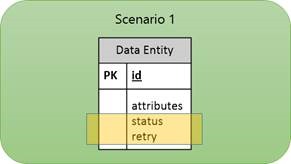
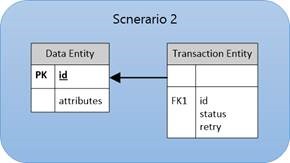
There are two different approaches you can use during database design to add these information. You can extend current entities or implement a separated entity that references the data table.

clip_image002

clip_image004

The second one, allow you to delete old transaction maintaining the table small and faster to query. In case you require a transaction history both approach are similar.

For simplicity, we will implement the first scenario.

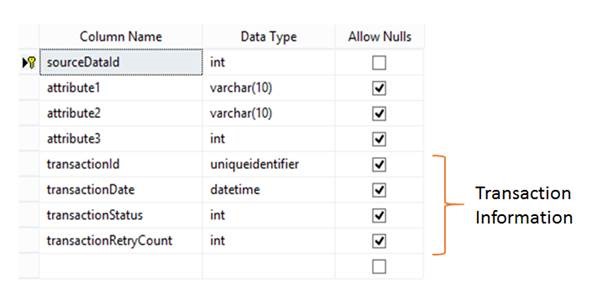
Following is described the table structure.

clip_image006

In the following table are detailed all the transaction information fields.

Field Name Description
transactionId This field is required during the polling operation to mark uniquely the data set to be processed.

It is very important to use it in scenarios where there are multiple hosts running the BizTalk receive port.

transactionDate Transaction Date
transactionStatus Transaction Status:

· To Process

· In Process

· Succeded

· Succeded with Warnings

· Failed (System Failure)

· Failed Retry not Allowed (Application managed error)

transactionRetryCount Retry Count: If the integration workflow is particularly complex, it becomes difficult to manage a retry logic directly on the ports.

For this reason I prefer to manually manage on the database side.

Database Procedures

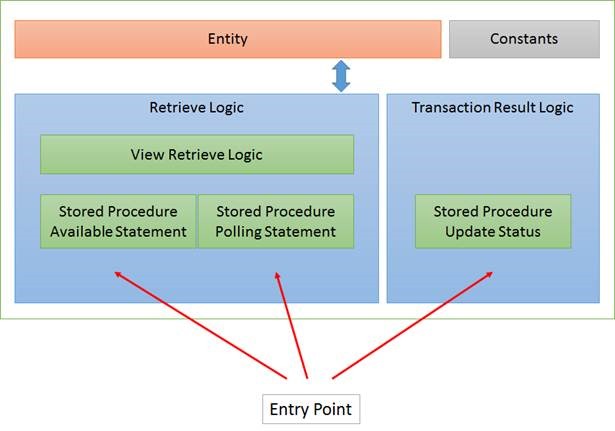
The figure below shows the approach in general.

clip_image008

Table Source Code
CREATE TABLE [dbo].[SourceData](
    [sourceDataId] [int] IDENTITY(1,1) NOT NULL,
    [attribute1] [varchar](10) NULL,
    [attribute2] [varchar](10) NULL,
    [attribute3] [int] NULL,
    [transactionId] [uniqueidentifier] NULL,
    [transactionDate] [datetime] NULL,
    [transactionStatus] [int] NULL,
    [transactionRetryCount] [int] NULL,
    CONSTRAINT [PK_SourceData] PRIMARY KEY CLUSTERED 
    (
        [sourceDataId] ASC
    )
    WITH (
            PAD_INDEX = OFF, 
            STATISTICS_NORECOMPUTE = OFF, 
            IGNORE_DUP_KEY = OFF, 
            ALLOW_ROW_LOCKS = ON, 
            ALLOW_PAGE_LOCKS = ON
        ) ON [PRIMARY]
) ON [PRIMARY]
GO
Constants Definition Source Code

Transaction Status Constants:

CREATE FUNCTION [dbo].[StatusToProcess]()
RETURNS INT
AS
BEGIN
    RETURN 0;
END
GO

CREATE FUNCTION [dbo].[StatusInProcess]()
RETURNS INT
AS
BEGIN
    RETURN 1;
END
GO

CREATE FUNCTION [dbo].[StatusSucceded]()
RETURNS INT
AS
BEGIN
    RETURN 2;
END
GO

CREATE FUNCTION [dbo].[StatusSuccededWithWarnings]()
RETURNS INT
AS
BEGIN
    RETURN 3;
END
GO

CREATE FUNCTION [dbo].[StatusFailed]()
RETURNS INT
AS
BEGIN
    RETURN 4;
END
GO

CREATE FUNCTION [dbo].[StatusFailedRetryNotAllowed]()
RETURNS INT
AS
BEGIN
    RETURN 5;
END
GO

Retry Logic Constants:

CREATE FUNCTION [dbo].[MaxRetryCount]()
RETURNS INT
AS
BEGIN
    RETURN 3;
END
GO

CREATE FUNCTION [dbo].[RetryInterval]()
RETURNS INT
AS
BEGIN
    RETURN 1;
END
GO
Views Source Code

The available statement and the polling statement, have in common the logic that determines which rows are to be processed.

Sometimes it can be quite complex so it is advisable define it into a view just to centralize.

CREATE VIEW [dbo].[SourceDataToProcess] AS

SELECT
    SourceData.sourceDataId

FROM
    SourceData

WHERE
    transactionStatus = dbo.StatusToProcess()
    OR
    (
        transactionStatus = dbo.StatusFailed()
        AND ISNULL(transactionRetryCount, 0) <= dbo.MaxRetryCount()
        AND GETDATE() > DATEADD(MINUTE, dbo.RetryInterval(), ISNULL(transactionDate, '01/01/2000'))
    );
Stored Procedures Source Code

From my point of view, the database is a service, for that reason, the entry point must be implemented exclusively through stored procedures.

Available Statement Procedure:

CREATE PROCEDURE [dbo].[SourceDataAvailableStmt]
AS
BEGIN

    SET NOCOUNT ON;
    SET XACT_ABORT ON;
    SET TRANSACTION ISOLATION LEVEL READ COMMITTED;

    SELECT
        COUNT(*)
    FROM
        SourceDataToProcess;

END

Polling Statement Procedure:

CREATE PROCEDURE [dbo].[SourceDataPollingStmt]
AS
BEGIN

    SET NOCOUNT ON;
    SET XACT_ABORT ON;
    SET TRANSACTION ISOLATION LEVEL READ COMMITTED;

    DECLARE @transactionId UNIQUEIDENTIFIER;

    SET @transactionId = NEWID();

    -- Lock processing records
    UPDATE SourceData
    SET
        transactionId = @transactionId,
        transactionDate = GETDATE(),
        transactionStatus = dbo.StatusInProcess()
    FROM
        SourceData

        INNER JOIN SourceDataToProcess
        ON SourceData.sourceDataId = SourceDataToProcess.sourceDataId;

    -- Return data
    SELECT     
        transactionId = CONVERT(CHAR(36), @transactionId),
        sourceDataId,
        attribute1,
        attribute2,
        attribute3

    FROM         
        SourceData WITH (NOLOCK)

    WHERE
        transactionId = @transactionId;

END

Update Status Procedure:

This procedure is used to set the final state of the transaction at the end of workflow integration.

CREATE PROCEDURE [dbo].[SourceDataUpdateStatus]
    @sourceDataId INT,
    @transactionStatus INT
AS
BEGIN

    SET NOCOUNT ON;
    SET XACT_ABORT OFF;
    SET TRANSACTION ISOLATION LEVEL READ COMMITTED;

    BEGIN TRY

        UPDATE SourceData
        SET
            transactionStatus = @transactionStatus,
            transactionRetryCount = CASE
                            WHEN @transactionStatus IN (dbo.StatusSucceded(), dbo.StatusSuccededWithWarnings()) THEN transactionRetryCount
                            WHEN @transactionStatus = dbo.StatusFailed() AND ISNULL(transactionRetryCount, 0) < dbo.MaxRetryCount() THEN ISNULL(transactionRetryCount, 0) + 1
                            ELSE 100
                            END,
            transactionDate = GETDATE()
        WHERE
            sourceDataId = @sourceDataId;

    END TRY
    BEGIN CATCH

        DECLARE @ERROR_NUMBER INT;
        DECLARE @ERROR_MESSAGE NVARCHAR(4000);
        DECLARE @ERROR_SEVERITY INT;
        DECLARE @ERROR_STATE INT;
        DECLARE @procedureName SYSNAME;

        SELECT
            @ERROR_NUMBER = ERROR_NUMBER(),
            @ERROR_MESSAGE = ERROR_MESSAGE(),
            @ERROR_SEVERITY = ERROR_SEVERITY(),
            @ERROR_STATE = ERROR_STATE(),
            @procedureName = ISNULL('Sql Procedure: "' + DB_NAME() + '.' + OBJECT_SCHEMA_NAME(@@PROCID) + '.' + OBJECT_NAME(@@PROCID) + '". ', '');

        SET @ERROR_MESSAGE = @procedureName + ' Error Detail: ' + @ERROR_MESSAGE;
        RAISERROR(@ERROR_MESSAGE, @ERROR_SEVERITY, @ERROR_STATE);

    END CATCH

END

BizTalk Process

The following figure shows the integration process.

clip_image002[5]

The transaction result status is initialized to “Success”. In the case in which an error occurs it will set to “Failed”.


Mapping data structures header-detail coming from database into hierarchical xml structures header-detail

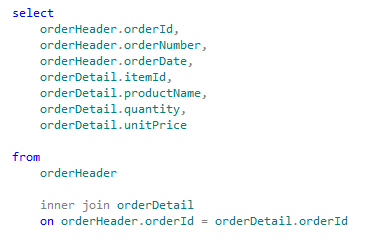
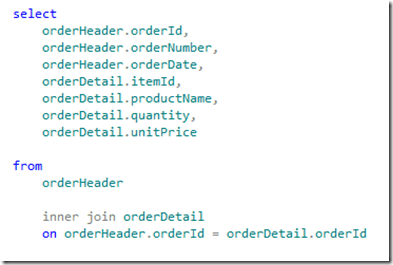
When you query databases that contain data structures in the form header-detail using statement of the type “select * from header inner join detail on …”, typically you obtain datasets that is difficult to map to hierarchical xml structures if not using custom XSLT.

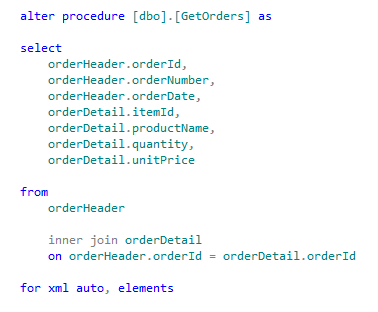
Using a SQL Server statement as shown below:
clip_image001

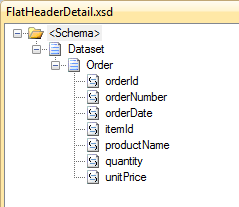
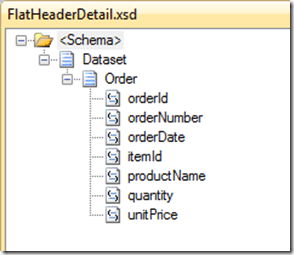
You get a schema similar to the following:
clip_image002

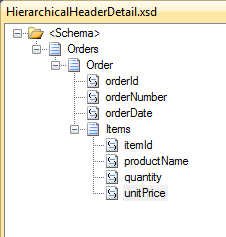
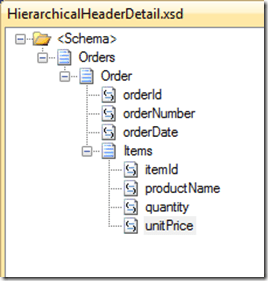
But often it must be mapped to a form of the type shown below:
clip_image003

The only way I know of to do this, is to use a map specifying a custom XSLT. This is an excellent solution if the mapping rules for individual fields are simple. If you need to deploy complex maps the XSLT could become difficult to implement and maintain.

Some time ago, Nino Crudele and I have implemented a custom pipeline component that brings together the functionality of the old SQL Adapter with the advantages of WCF-SQL Adapter.

Summarizing what allows you to make this custom pipeline component is:

1. You call a stored procedure that performs the query;

2. The query contains FOR XML AUTO or in any case it returns the data in XML form;

3. The pipeline extracts the XML string from the return message and engages in a specified schema;

4. The new scheme can be used as the source of the map.

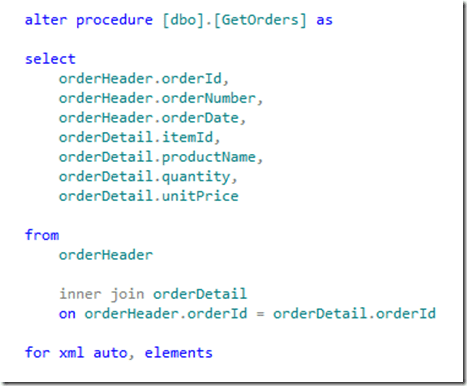
Creating the stored procedure
clip_image004

Generating the schemas

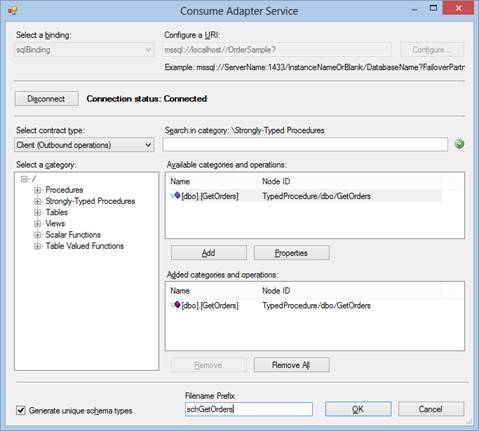
You have to generate the schema for the WCF-SQL port and the hierarchical XML schema. To generate the first schema use the consume adapter service wizard.
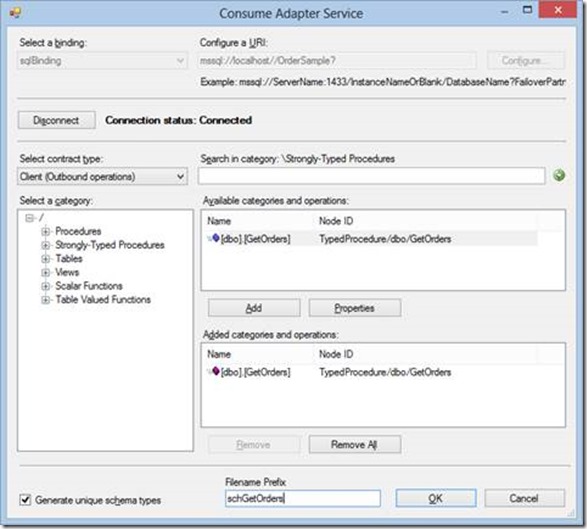
clip_image006

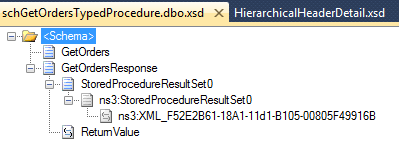
This wizard generates the following schema:
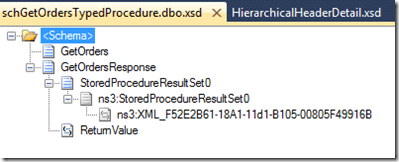
clip_image007

“XML_F52E2B61-18A1-11d1-B105-00805F49916B” is the field that will contains the XML returned by the stored procedure.

Now you have to generate the schema for the XML message. To do that you can use the old SQL Adapter.

So, temporary add “, xmldata” at the end of the stored procedure (the statement became “for xml auto, elements, xmldata”). You have to remove it at the end of the wizard.

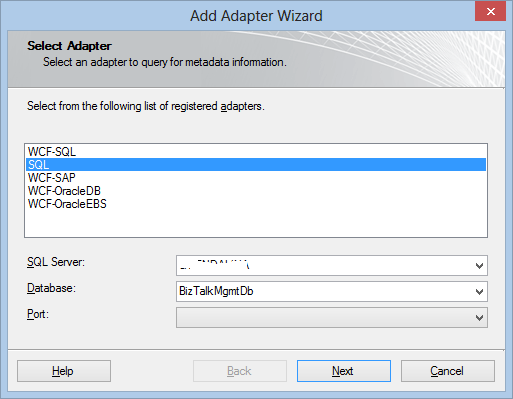
In your project add generated item and select “Add Adapter Metadata”, then select “SQL”
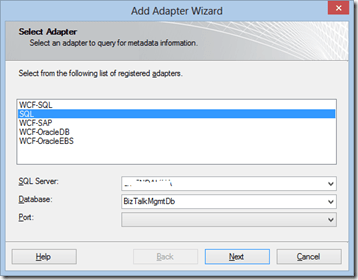
clip_image008

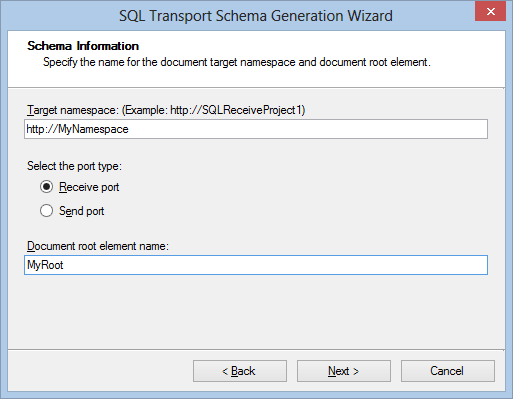
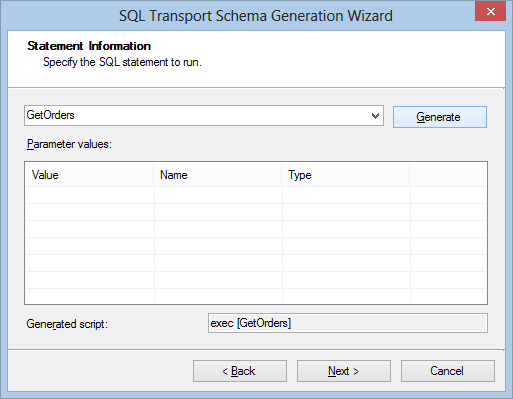
Specify a connection string and click Next. In the SQL Transport Schema Generation Wizard page, specify “Receive Port”, a target namespace and a root name.

Note that the FOR XML AUTO clause does not return the root node element. This is why the wizard is asking you to specify it.
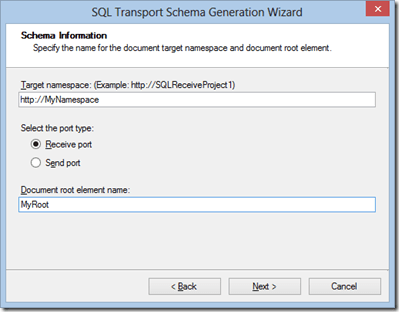
clip_image009

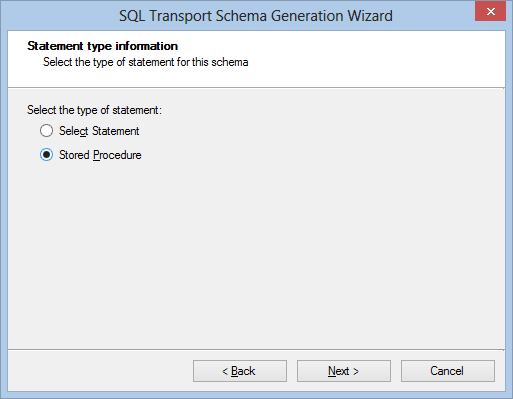
Click Next and select “Stored Procedure”
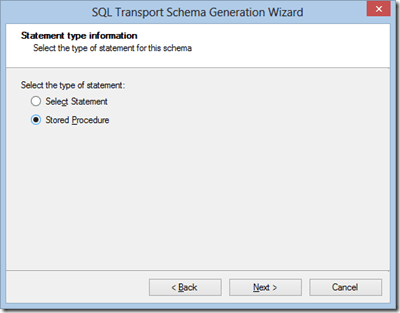
clip_image010

Select you stored procedure and click on Generate.
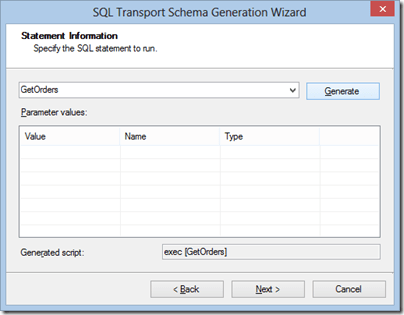
clip_image011

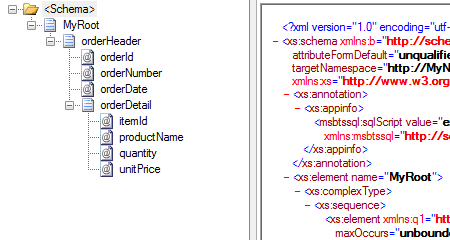
Then click Next to complete the wizard. What you get is the following schema:
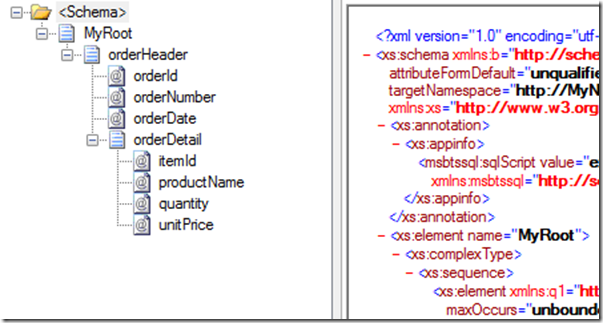
clip_image012

Now you have to clear the Target Namespace property for this schema.

Regarding the schema of the stored procedure is all that is needed. Remember that you have to use the schema generated by the WCF-SQL adapter for the send operation to the database, and the schema generated by the SQL Adapter for receiving the response.

Creating the Pipeline

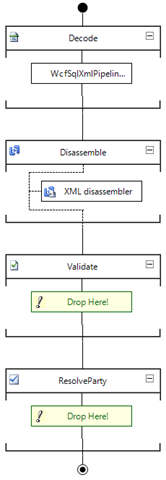
To complete development activities, it is need to create a receive pipeline that includes the custom pipeline component as shown in the following picture.
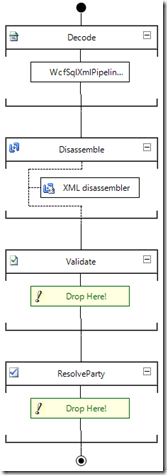
clip_image013

Port configuration

From the administration console, import the binding file generated from the WCF-SQL adapter wizard during the schema generation.

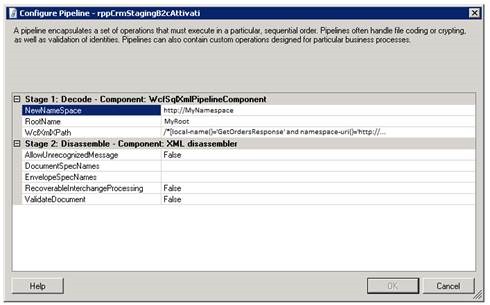
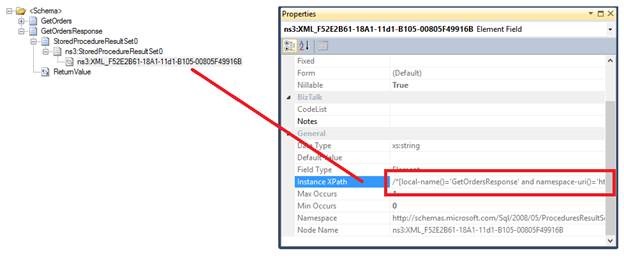
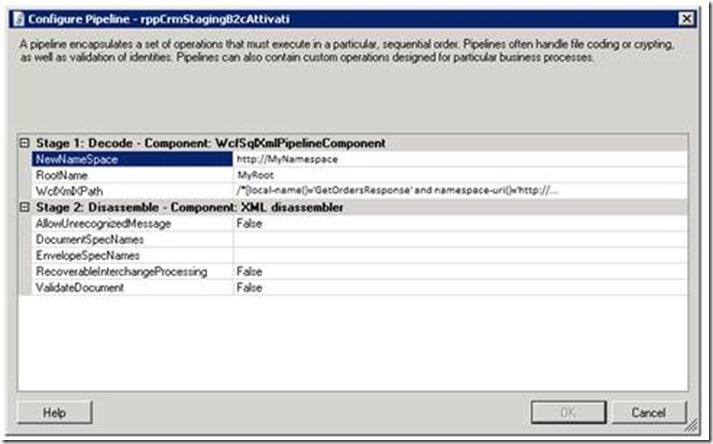
Change the receive pipeline, specifying what developed in the previous chapter. In the property of the receive pipeline, specify the namespace, the root element of the SQL adapter generated schema and the XPath query of the element of the schema WCF-SQL that contains the XML result as shown in the follow.
clip_image015

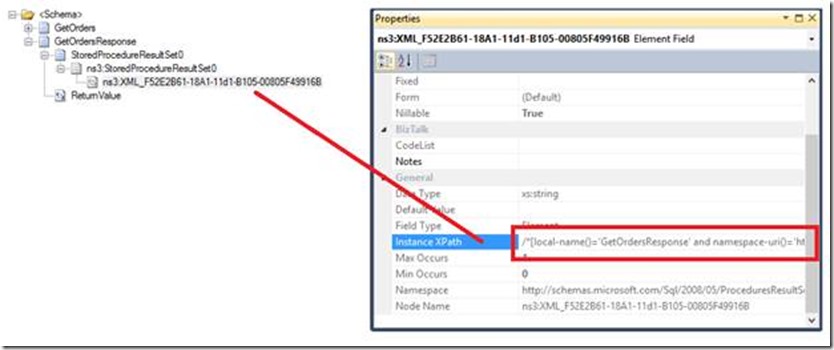
You can find the XPath query in the WCF-SQL schema.
clip_image017

Source code

Following you can find the custom pipeline component source code.

using System;
using System.Text;
using System.Xml;
using System.IO;
using Microsoft.BizTalk.Message.Interop;
using Microsoft.BizTalk.Component.Interop;
using System.Xml.XPath;
using System.ComponentModel;
using System.Diagnostics;

namespace Sample.CustomPipeline
{
    [ComponentCategory(CategoryTypes.CATID_PipelineComponent)]
    [ComponentCategory(CategoryTypes.CATID_Decoder)]
    [System.Runtime.InteropServices.Guid("9d0e4103-4cce-4536-83fa-4a5040674ad6")]
    public class WcfSqlXmlPipelineComponent : IBaseComponent, IComponentUI, Microsoft.BizTalk.Component.Interop.IComponent, IPersistPropertyBag
    {

        #region properties

        private string wcfXmlXPath;

        [System.ComponentModel.Description("Specify the XPath query of the WCF XML node data.")]
        public string WcfXmlXPath
        {
            get { return wcfXmlXPath; }
            set { wcfXmlXPath = value; }
        }

        private string newNameSpace;

        [System.ComponentModel.Description("Namespace to be assigned.")]
        public string NewNameSpace
        {
            get { return newNameSpace; }
            set { newNameSpace = value; }
        }

        private string rootName;

        [System.ComponentModel.Description("XML Root name to be assigned.")]
        public string RootName
        {
            get { return rootName; }
            set { rootName = value; }
        }

        #endregion

        #region IBaseComponent Members

        [Browsable(false)]
        public string Description
        {
            get
            {
                return "Pipeline component used to return a specific XML SQL statement";
            }
        }

        [Browsable(false)]
        public string Name
        {
            get { return "WcfSqlXmlPipelineComponent"; }
        }

        [Browsable(false)]
        public string Version
        {
            get { return "1.0.0.0"; }
        }

        #endregion

        #region IPersistPropertyBag Members

        public void GetClassID(out Guid classID)
        {
            classID = new Guid("0C86A664-3D33-4E70-99AE-E130D9D8620C");
        }

        public void InitNew()
        {

        }

        public void Load(IPropertyBag pb, int errorLog)
        {

            object val;
            val = ReadPropertyBag(pb, "WcfXmlXPath");
            if ((val != null))
            {
                wcfXmlXPath = ((string)(val));
            }

            val = ReadPropertyBag(pb, "NewNameSpace");
            if ((val != null))
            {
                newNameSpace = ((string)(val));
            }

            val = ReadPropertyBag(pb, "RootName");
            if ((val != null))
            {
                rootName = ((string)(val));
            }
        }

        public void Save(IPropertyBag pb, bool clearDirty, bool saveAllProperties)
        {
            WritePropertyBag(pb, "WcfXmlXPath", WcfXmlXPath);
            WritePropertyBag(pb, "NewNameSpace", NewNameSpace);
            WritePropertyBag(pb, "RootName", RootName);
        }

        #region utility functionality

        /// <summary>
        /// Reads property value from property bag
        /// </summary>
        /// <param name="pb">Property bag</param>
        /// <param name="propName">Name of property</param>
        /// <returns>Value of the property</returns>
        private object ReadPropertyBag(IPropertyBag pb, string propName)
        {
            object val = null;
            try
            {
                pb.Read(propName, out val, 0);
            }
            catch (ArgumentException)
            {
                return val;
            }
            catch (Exception e)
            {
                throw new ApplicationException(e.Message);
            }
            return val;
        }

        /// <summary>
        /// Writes property values into a property bag.
        /// </summary>
        /// <param name="pb">Property bag.</param>
        /// <param name="propName">Name of property.</param>
        /// <param name="val">Value of property.</param>
        private void WritePropertyBag(IPropertyBag pb, string propName, object val)
        {
            try
            {
                pb.Write(propName, ref val);
            }
            catch (Exception e)
            {
                throw new ApplicationException(e.Message);
            }
        }
        #endregion

        #endregion

        #region IComponentUI Members

        /// <summary>
        /// Component icon to use in BizTalk Editor
        /// </summary>
        [Browsable(false)]
        public IntPtr Icon
        {
            get { return new IntPtr(); }
        }

        System.Collections.IEnumerator IComponentUI.Validate(object projectSystem)
        {
            return null;
        }

        #endregion

        #region IComponent Members

        public IBaseMessage Execute(IPipelineContext pContext, IBaseMessage pInMsg)
        {

            string systemPropertiesNamespace = @"http://schemas.microsoft.com/BizTalk/2003/system-properties";
            string messageType = string.Concat(newNameSpace, "#", rootName);
            StringBuilder outMessage = new StringBuilder();

            try
            {

                Debug.Write("Execute started");

                IBaseMessagePart bodyPart = pInMsg.BodyPart;

                if (bodyPart != null)
                {

                    Stream messageInputStream = bodyPart.GetOriginalDataStream();
                    string xmlMessage = ExtractDataValueXPath(messageInputStream, wcfXmlXPath);

                    outMessage.Append(string.Format("<{0}>", rootName));
                    outMessage.Append(xmlMessage);
                    outMessage.Append(string.Concat("</", rootName, ">"));

                    Debug.Write(String.Concat("messageType: ", messageType));
                    Debug.Write(String.Concat("rootName: ", rootName));
                    Debug.Write(String.Concat("wcfXmlXPath: ", wcfXmlXPath));
                    Debug.Write(String.Concat("xmlMessage: ", xmlMessage));

                    byte[] outBytes = System.Text.Encoding.ASCII.GetBytes(outMessage.ToString());

                    MemoryStream memStream = new MemoryStream();
                    memStream.Write(outBytes, 0, outBytes.Length);
                    memStream.Position = 0;
                    bodyPart.Data = memStream;
                    pContext.ResourceTracker.AddResource(memStream);

                }

                pInMsg.Context.Promote("MessageType", systemPropertiesNamespace, messageType);

            }
            catch (Exception exc)
            {
                Debug.Write(exc.Message);
                throw;
            }
            finally
            {
                Debug.Write("Execute finished");
            }

            return pInMsg;

        }

        #endregion

        private string ExtractDataValueXPath(Stream MsgStream, string MsgXPath)
        {

            XmlReaderSettings settings = new XmlReaderSettings()
            {

                ConformanceLevel = ConformanceLevel.Document,
                IgnoreWhitespace = true,
                ValidationType = ValidationType.None,
                IgnoreProcessingInstructions = true,
                IgnoreComments = true,
                CloseInput = false
            };

            MsgStream.Seek(0, SeekOrigin.Begin);
            XmlReader reader = XmlReader.Create(MsgStream, settings);
            StringBuilder strValue = new StringBuilder();

            if (!string.IsNullOrEmpty(MsgXPath))
            {
                if (reader.Read())
                {
                    XPathDocument xPathDoc = new XPathDocument(reader);
                    XPathNavigator xNavigator = xPathDoc.CreateNavigator();
                    XPathNodeIterator xNodes = xNavigator.Select(MsgXPath);
                    while (xNodes.MoveNext())
                    {
                        strValue.Append(xNodes.Current.Value);
                    }
                    MsgStream.Seek(0, SeekOrigin.Begin);
                }
            }

            return strValue.ToString();
        }

    }
}

 

BizTalk in virtual environment


For reasons that may be economic or simplicity in the daily management of systems, server infrastructure are increasingly based on virtual environments. No matter whether on premise or on the Cload, the important thing is to virtualize.

A valuable document which speaks of the effects of virtualization infrastructure BizTalk is “http://msdn.microsoft.com/en-US/library/dd722834 (v = BTS.10). Aspx”.

However, we must consider that in virtual environments is not very important what is virtualized, but who virtualizes.

So no matter which version of BizTalk or the version of the operating system that hosts it, but the virtualization system that hosts the virtual machine.

In this sense, in environments where the virtualizer is Microsoft Hyper-V, it is important to know that the 2012 version has made ​​tremendous strides from a performance point of view and it is good to consider an upgrade to this version.

In particular, it was changed the architecture of virtualization from Type 2 to Type 1.


From Wikipedia

In their 1974 article “Formal Requirements for Virtualizable Third Generation Architectures” Gerald J. Popek and Robert P. Goldberg classified two types of hypervisor:

Type 1 (or native, bare metal) hypervisors run directly on the host’s hardware to control the hardware and to manage guest operating systems. A guest operating-system thus runs on another level above the hypervisor.
This model represents the classic implementation of virtual-machine architectures; IBM developed the original hypervisors as bare-metal tools in the 1960s: the test tool, SIMMON, and CP/CMS. CP/CMS was the ancestor of IBM’s z/VM. Modern equivalents include Oracle VM Server for SPARC, Oracle VM Server for x86, the Citrix XenServer and VMware ESX/ESXi.

Type 2 (or hosted) hypervisors run within a conventional operating-system environment. With the hypervisor layer as a distinct second software level, guest operating-systems run at the third level above the hardware. VMware Workstation and VirtualBox exemplify Type 2 hypervisors.

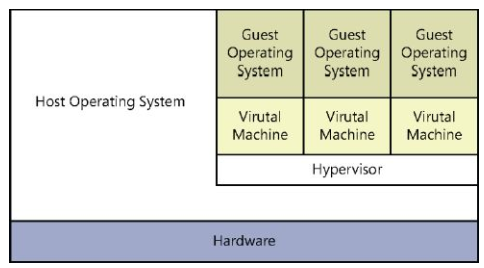
In other words, Type 2 virtualization involves that hypervisor runs on top of a host OS as shown in the following picture.

clip_image001

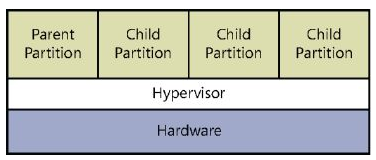
Type 1 virtualization (Windows 2012), involves that hypervisor is an abstraction layer that interacts directly with the computer’s physical hardware, that is, without an intervening host OS, as shown in the following picture.

clip_image002

BizTalk Innovation Day 2013 Italy

image

It’s a great pleasure to announce the BizTalk Innovation Day 2013, which will be held in Italy on October 17, the event is free and places are limited.

As always many interesting sessions, all BizTalk Crew will be there and Special Guest Paolo Salvatori.

The conference, which will take place on October 17 at the Microsoft innovation Campus will touch on a variety of the most up-to-date topics in the realm of applications integration, such as BizTalk Server, Windows Azure, Service Bus, BizTalk Sever PaaS and IaaS. The guests will be presented with effective solutions and ground-breaking strategies.

The sessions:

Steef-Jan Wiggers
BizTalk Server 2013 and the Windows Azure Service Bus: Hybrid Solutions

Paolo Salvatori
Use Windows Azure Service Bus, BizTalk Services, Mobile Services, and BizTalk Server to create hybrid solutions

Saravana Kumar
Management and Monitoring of BizTalk Server using BizTalk360

Sandro Pereira
BizTalk Mapping Patterns and Best Practices

Tord Glad Nordahl
Proactivity in BizTalk

Nino Crudele and me
BizTalk 2013: All about in real environment

Thanks to Microsys  and Microsoft Italy for the big sponsorship.

Thanks to WindowServer.it community for all technical support.

All event detail here

Register to the event Here

Ordered Delivery option just to serialize calls

Most of the integration scenarios includes database systems among the interlocutors.

If the database is not large, and contains a simple architecture of entities, develop interfaces is not so difficult.

Otherwise, if the architecture of entities and relationships is very complex and the occupation of space is hundreds of GB, it might be more difficult to write interfaces.

In this scenario, you can find thousands of tables, views, stored procedures with hundreds of lines of code and functions.

In these contexts, often we not even have visibility of the services that we going to call, and the risk of generating dead lock on tables is extremely high. This risk could increase, especially in the case of use of techniques such as message de-batching where BizTalk Server generates multiple thread with a perfect parallelism.

To overcome this, if you don’t have the opportunity to act within the stored procedures correcting the architecture of the lock, it is possible to enable the “ordered delivery” option on the WCF send port.

“When the port bound to the transport is marked for ordered delivery, then BizTalk Server enforces ordered delivery by ensuring that the transport does not get the next outbound message until the current one has been successfully sent. To achieve this, BizTalk Server passes each message to the transport’s adapter in a single batch and waits until the adapter has successfully deleted the message from the message box before delivering the next message, in another batch, to the adapter.”

Obvious that this is only an extreme measure and it is advisable to apply it only if is acceptable for the process, serializing the calls to the database, that even if they occupy a very small percentage of the whole process, still represent a bottleneck.

Insert Master-Detail data structure on SQL Server in a single transaction using BizTalk Server


In the last days, we need to enter data structures of master-detail type in SQL Server inside a single transaction.

Initially we tried to invoke the insertion of the header and the insertion of the details using two send shapes inside an atomic scope. Soon we realized that BizTalk activates the DTC only using WCF WS-http.

So we thought to use the composite operation technic that so far we only used to invoke n times the same stored procedure and in particular to insert batch of records.

Microsoft’s documentation is very clear in regard and illustrates different possibilities in using this technique (http://msdn.microsoft.com/en-us/library/dd788136.aspx).

However, since there is nothing on the Internet that describes our specific case, or at least we did not find any example, we decided to illustrate a simple case that I hope will be useful.

In the following paragraphs, we show the steps to prepare the database, create the BizTalk project and deploy the example.

Database setup

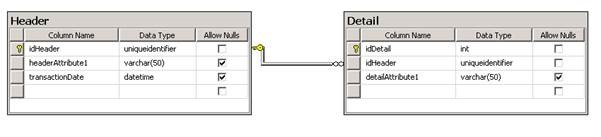
For brevity, the used data structure is very simple and is composed just from two table in master-detail form.

Following the data diagram.

clip_image002

Once created the data structure we have created two stored procedures for entering data in the two tables.

Below is the script to create the database, tables and stored procedures.

USE [master] 
GO 

CREATE DATABASE [MyDatabase] 
GO 

USE [MyDatabase] 
GO 

CREATE TABLE [dbo].[Header]
( 
    [idHeader] [uniqueidentifier] NOT NULL, 
    [headerAttribute1] [varchar](50) NULL, 
    [transactionDate] [datetime] NULL, 

    CONSTRAINT [PK_Header] PRIMARY KEY CLUSTERED 
    ( 
    [idHeader] ASC 
    ) WITH (PAD_INDEX = OFF, STATISTICS_NORECOMPUTE = OFF, IGNORE_DUP_KEY = OFF, ALLOW_ROW_LOCKS = ON, ALLOW_PAGE_LOCKS = ON) ON [PRIMARY] 
) ON [PRIMARY] 
GO 

CREATE TABLE [dbo].[Detail]
( 
    [idDetail] [int] IDENTITY(1,1) NOT NULL, 
    [idHeader] [uniqueidentifier] NOT NULL, 
    [detailAttribute1] [varchar](50) NULL, 

    CONSTRAINT [PK_Detail] PRIMARY KEY CLUSTERED 
    ( 
    [idDetail] ASC 
    ) WITH (PAD_INDEX = OFF, STATISTICS_NORECOMPUTE = OFF, IGNORE_DUP_KEY = OFF, ALLOW_ROW_LOCKS = ON, ALLOW_PAGE_LOCKS = ON) ON [PRIMARY] 
) ON [PRIMARY] 
GO 

CREATE PROCEDURE [dbo].[insertHeader] 
    @idHeader CHAR(36), 
    @headerAttribute1 VARCHAR(50) 
AS 
BEGIN 

    INSERT INTO Header 
    ( 
        idHeader, 
        headerAttribute1, 
        transactionDate 
    ) 
    VALUES 
    ( 
        @idHeader, 
        @headerAttribute1, 
        GETDATE() 
    ) 

END 
GO 

CREATE PROCEDURE [dbo].[insertDetail] 
    @idHeader CHAR(36), 
    @detailAttribute1 VARCHAR(50) 
AS 
BEGIN 

    INSERT INTO Detail 
    ( 
        idHeader, 
        detailAttribute1 
    ) 
    VALUES 
    ( 
        @idHeader, 
        @detailAttribute1 
    ) 

END 
GO 

ALTER TABLE [dbo].[Detail] WITH CHECK ADD CONSTRAINT [FK_Detail_Header] FOREIGN KEY([idHeader]) 
REFERENCES [dbo].[Header] ([idHeader]) 
ON DELETE CASCADE 
GO 

ALTER TABLE [dbo].[Detail] CHECK CONSTRAINT [FK_Detail_Header] 
GO


BizTalk Project

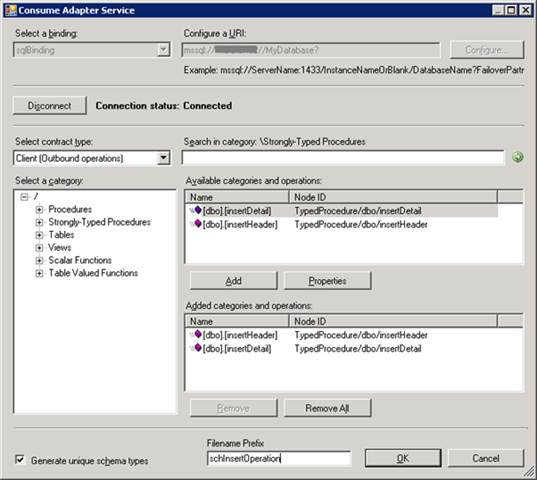
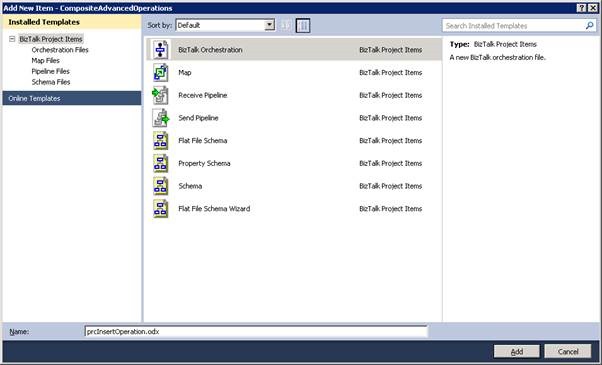
Create a new BizTalk project and generate the schema for the stored procedures. The following figure shows the most important step during generation.

clip_image003

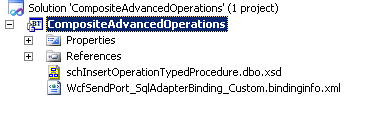
Once schema is generated, you should have the following items inside the project.

clip_image004

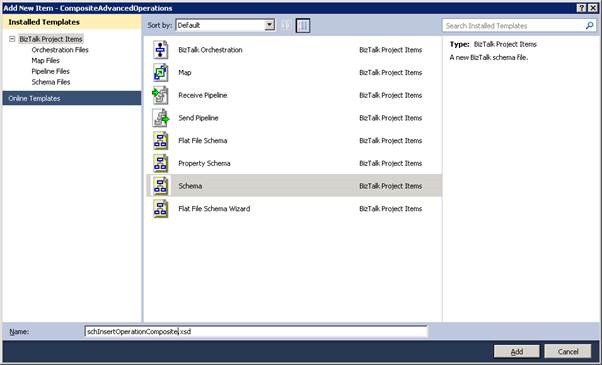
Now we have created a schema for composite operation.

clip_image006

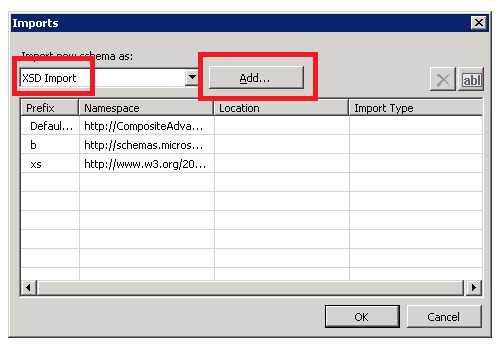
In the property of the schema, you have to import the stored procedure schema as shown in the follow.

clip_image007

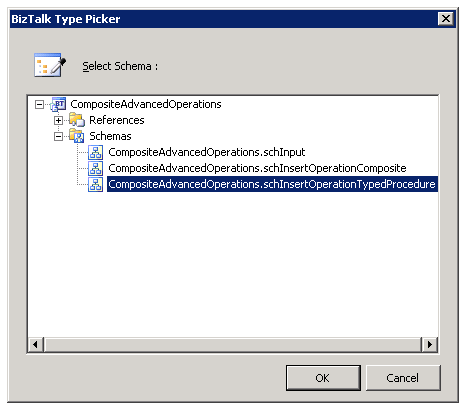
Select the schema generated in the previous step.

clip_image008

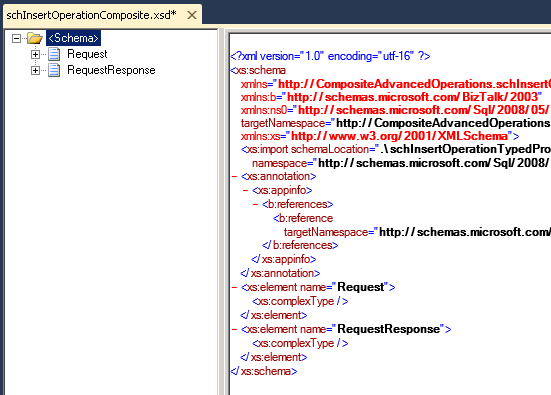
Now create two root element that, as from specific, you have to name Request and RequestResponse.

clip_image009

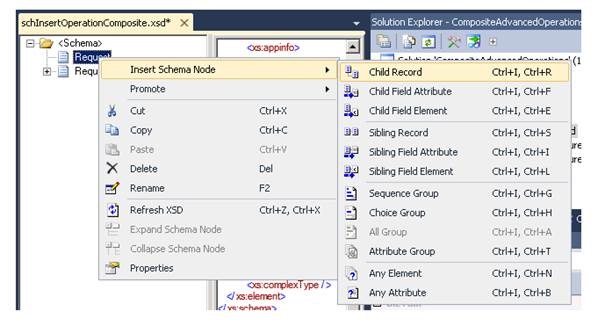
In the Request root element, create a child record for the input of Header stored procedure.

clip_image011

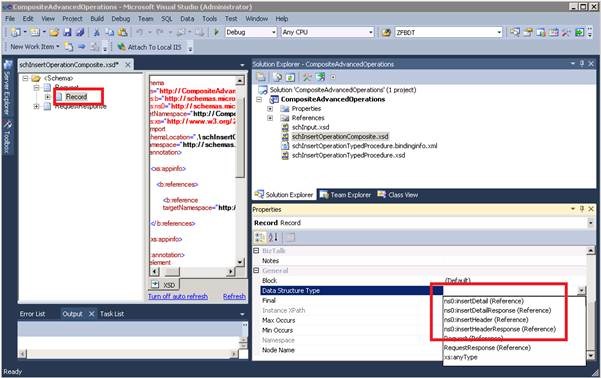
In the Data Structure Type specify “InsertHeader”.

clip_image013

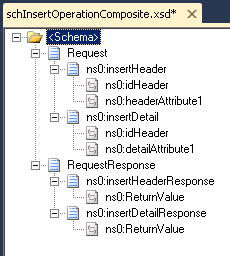
Repeat the previous step for the Detail, the Header response and Detail response. You should obtain the following schema.

clip_image014

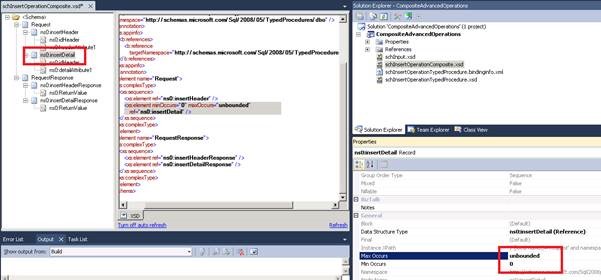
You must then specify the min occurs and max occurs properties.

clip_image016

Now you have to create an input schema. Following you can find a very simple example that we used.

<?xml version="1.0" encoding="utf-16"?> 
<xs:schema xmlns="http://CompositeAdvancedOperations.schInput" xmlns:b="http://schemas.microsoft.com/BizTalk/2003" targetNamespace="http://CompositeAdvancedOperations.schInput" xmlns:xs="http://www.w3.org/2001/XMLSchema"> 
    <xs:element name="MyEntity"> 
        <xs:complexType> 
            <xs:sequence> 
                <xs:element name="entityId" type="xs:string" /> 
                <xs:element name="headerAttribute1" type="xs:string" /> 
                <xs:element minOccurs="0" maxOccurs="unbounded" name="entityDetail"> 
                    <xs:complexType> 
                        <xs:sequence> 
                            <xs:element name="detailAttribute1" type="xs:string" /> 
                        </xs:sequence> 
                    </xs:complexType> 
                </xs:element> 
            </xs:sequence> 
        </xs:complexType> 
    </xs:element> 
</xs:schema>


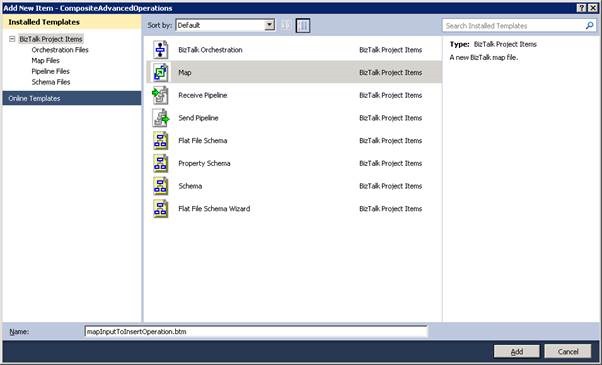
Create a map for the transformation from input schema to insert operation.

clip_image018

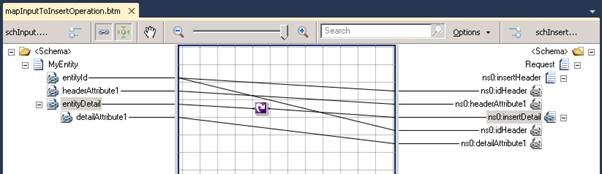
Following the simple map.

clip_image020

Now generate an input XML instance in order to test the solution.

<ns0:MyEntity xmlns:ns0="http://CompositeAdvancedOperations.schInput"> 
    <entityId>2F9509A4-5CDF-4C15-8B59-ECD7F9B8E5F6</entityId> 
    <headerAttribute1>HEAD</headerAttribute1> 
    <entityDetail> 
        <detailAttribute1>A</detailAttribute1> 
    </entityDetail> 
    <entityDetail> 
        <detailAttribute1>B</detailAttribute1> 
    </entityDetail> 
    <entityDetail> 
        <detailAttribute1>C</detailAttribute1> 
    </entityDetail> 
</ns0:MyEntity>


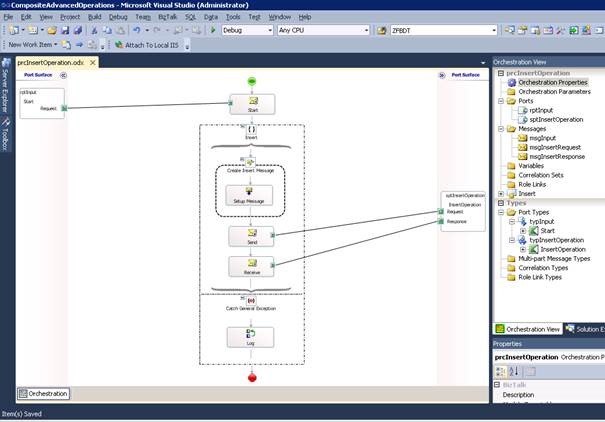
Finally create the orchestration.

clip_image022

I think should be simple to imagine the integration flow.

clip_image024

BizTalk Administrative Task

From the BizTalk Administration interface, you have to create a new application and create the needed ports.

You can create the send port that calls the stored procedure simply by using the binding file that visual studio has generated.

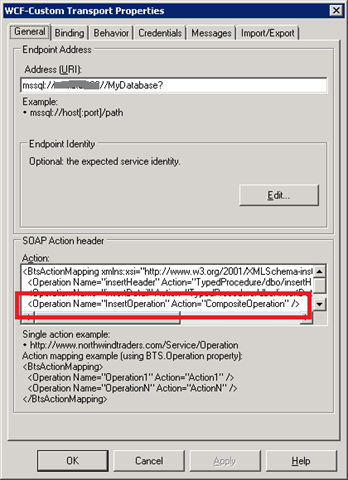
As from specific, remember to add the action inside the send port from the composite operation.

clip_image025

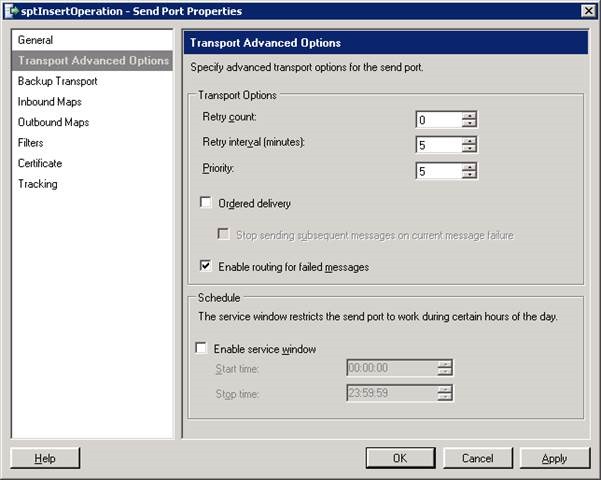
In order to manage the error inside the orchestration you can modify the following parameters.

clip_image027

After, you have to create the receive port and location manually.

Polling Oracle Database Using Stored Procedures, Functions, or Packaged Procedures and Functions


This document shows the step to configure a polling operation using Oracle Function or Packaged Procedure and Functions.

Please refer to MSD article for additional detail (http://msdn.microsoft.com/en-us/library/dd788064.aspx).

Procedure

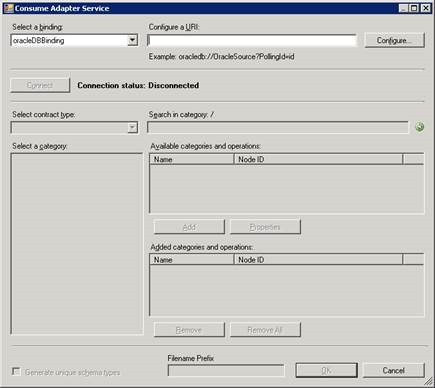
Open Visual Studio, create a new BizTalk project and generate the polling schema using Consume Adapter Service wizard.

clip_image002

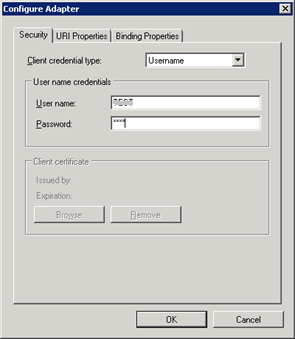
Click on “Configure”.

clip_image003

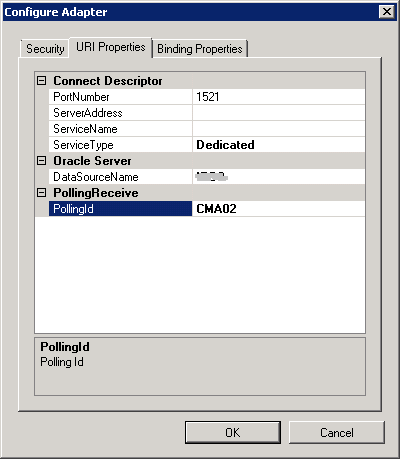
Specify a PollingId as Polling Unique Identifier.

clip_image004

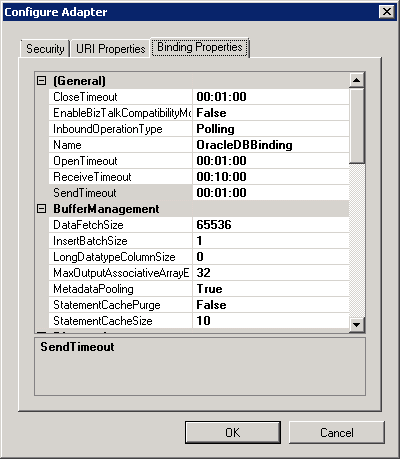
Leave the following form with default settings.

clip_image005

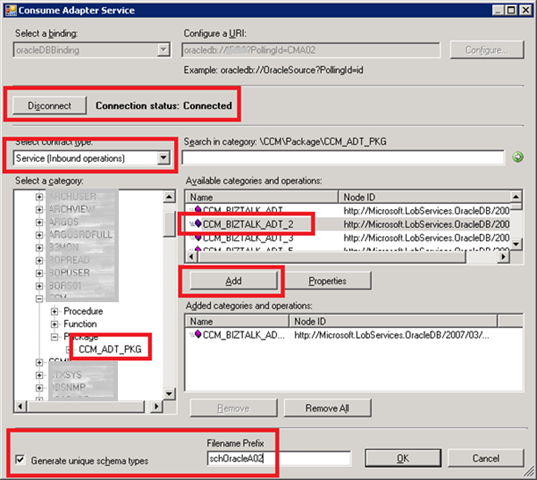
Connect to the database, select “Service (inbound operation)” and choose the Oracle function.

clip_image006

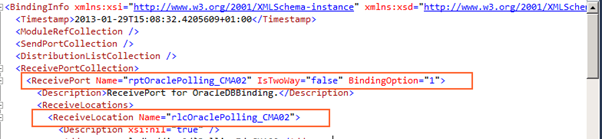
Edit binding file in order to set the following properties:

1. Receive port name

2. Receive location name

clip_image007

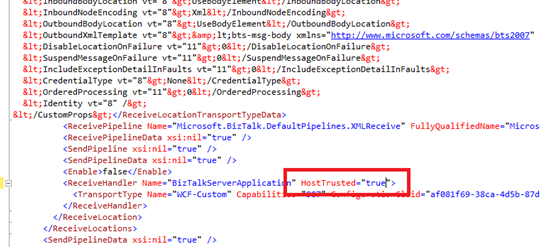
3. If BizTalk host is Trusted you should set host trusted equal to true.

clip_image008

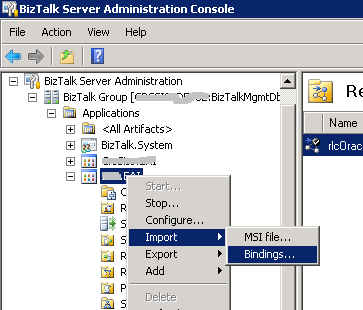
From BizTalk Administration import the generated binding file.

clip_image009

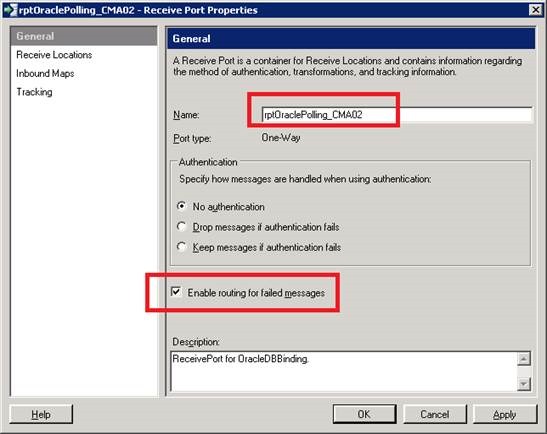
If needed, rename the receive port and enable routing for failed messages.

clip_image011

Rename the receive location.

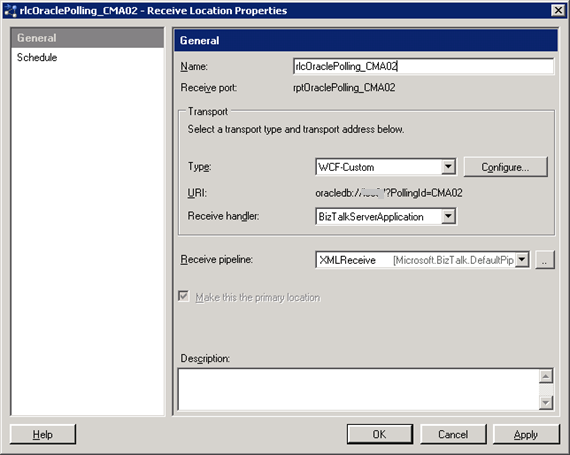
clip_image012

Click on Configure and set the following properties:

PolledDataAvailableStatement

In this example, we use the Oracle function CCM_ADT_PKG.CCM_COUNT, which require a string parameter.

SELECT CCM_ADT_PKG.CCM_COUNT('A02') FROM DUAL

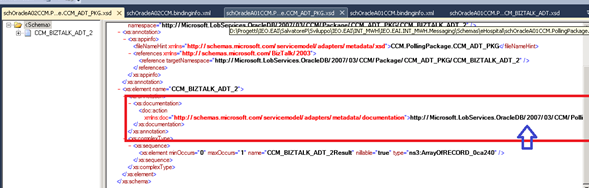
PollingAction

From Visual Studio open the schema “schOracleA02CCM.PollingPackage.CCM_ADT_PKG.xsd” and find for the “action” element.

clip_image013

Copy the url “http://Microsoft.LobServices.OracleDB/2007/03/CCM/PollingPackage/CCM_ADT_PKG/CCM_BIZTALK_ADT_2” and set the PollingAction property.

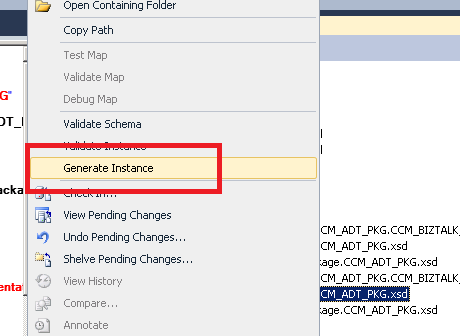
PollingStatement

From visual studio, generate a XML instance for the schema “schOracleA02CCM.Package.CCM_ADT_PKG.xsd”.

clip_image014

Modify XML content setting up the right parameters.

<ns0:CCM_BIZTALK_ADT_2 xmlns:ns0="http://Microsoft.LobServices.OracleDB/2007/03/CCM/Package/CCM_ADT_PKG">
    <ns0:TIPO_MESSAGGIO>A02</ns0:TIPO_MESSAGGIO>
    <ns0:FL_ELABORAZIONE>0</ns0:FL_ELABORAZIONE>
</ns0:CCM_BIZTALK_ADT_2>

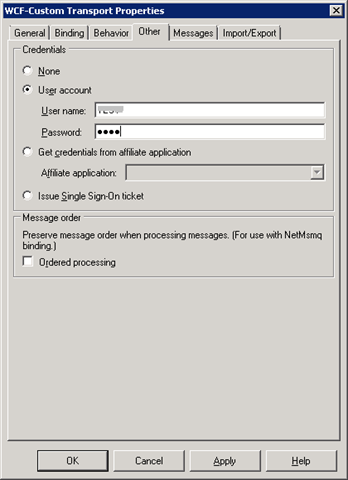
Set Polling Interval to 30 seconds and user name and password.

clip_image015