
When you query databases that contain data structures in the form header-detail using statement of the type “select * from header inner join detail on …”, typically you obtain datasets that is difficult to map to hierarchical xml structures if not using custom XSLT.
Using a SQL Server statement as shown below:
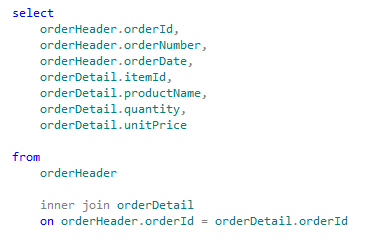
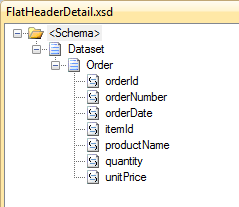
You get a schema similar to the following:
But often it must be mapped to a form of the type shown below:
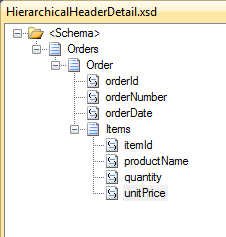
The only way I know of to do this, is to use a map specifying a custom XSLT. This is an excellent solution if the mapping rules for individual fields are simple. If you need to deploy complex maps the XSLT could become difficult to implement and maintain.
Some time ago, Nino Crudele and I have implemented a custom pipeline component that brings together the functionality of the old SQL Adapter with the advantages of WCF-SQL Adapter.
Summarizing what allows you to make this custom pipeline component is:
1. You call a stored procedure that performs the query;
2. The query contains FOR XML AUTO or in any case it returns the data in XML form;
3. The pipeline extracts the XML string from the return message and engages in a specified schema;
4. The new scheme can be used as the source of the map.
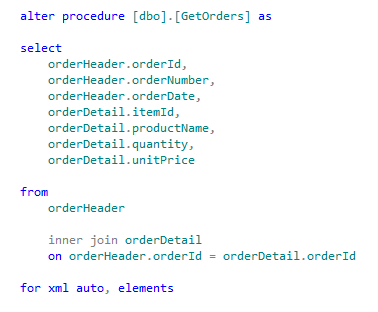
Creating the stored procedure
Generating the schemas
You have to generate the schema for the WCF-SQL port and the hierarchical XML schema. To generate the first schema use the consume adapter service wizard.
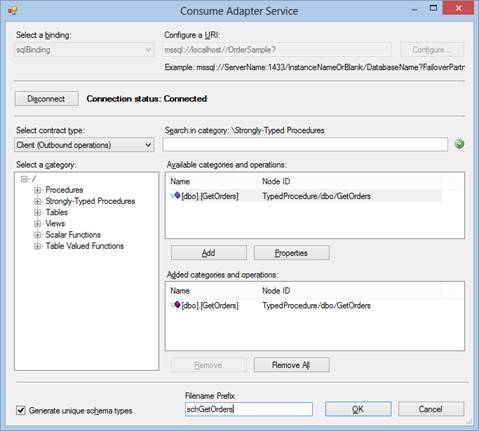
This wizard generates the following schema:
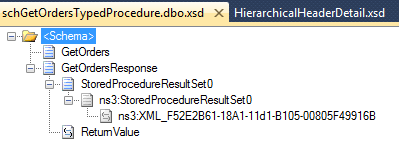
“XML_F52E2B61-18A1-11d1-B105-00805F49916B” is the field that will contains the XML returned by the stored procedure.
Now you have to generate the schema for the XML message. To do that you can use the old SQL Adapter.
So, temporary add “, xmldata” at the end of the stored procedure (the statement became “for xml auto, elements, xmldata”). You have to remove it at the end of the wizard.
In your project add generated item and select “Add Adapter Metadata”, then select “SQL”
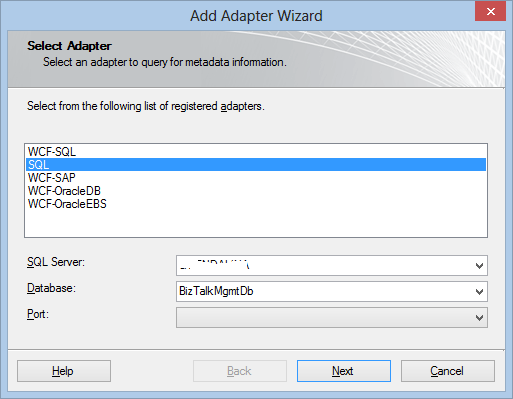
Specify a connection string and click Next. In the SQL Transport Schema Generation Wizard page, specify “Receive Port”, a target namespace and a root name.
Note that the FOR XML AUTO clause does not return the root node element. This is why the wizard is asking you to specify it.
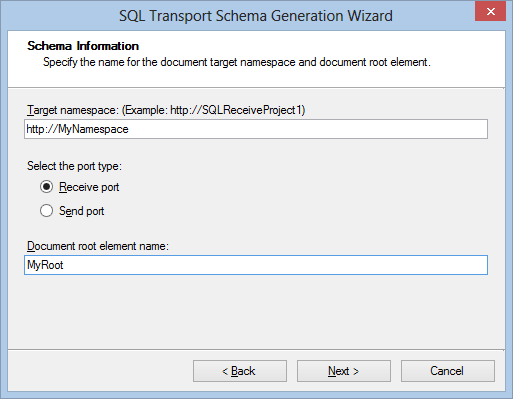
Click Next and select “Stored Procedure”
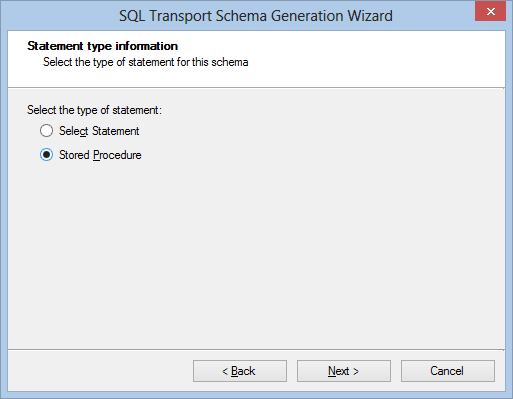
Select you stored procedure and click on Generate.
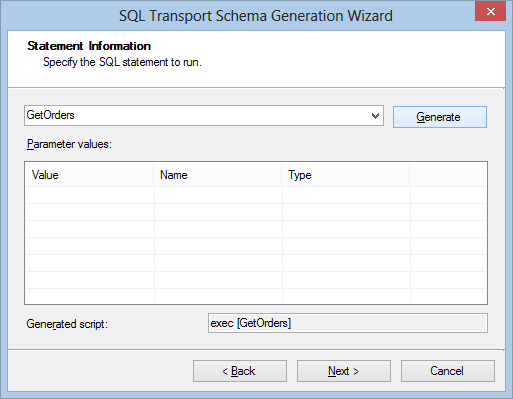
Then click Next to complete the wizard. What you get is the following schema:
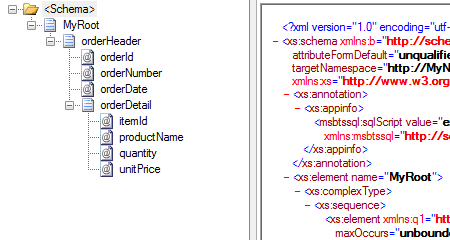
Now you have to clear the Target Namespace property for this schema.
Regarding the schema of the stored procedure is all that is needed. Remember that you have to use the schema generated by the WCF-SQL adapter for the send operation to the database, and the schema generated by the SQL Adapter for receiving the response.
Creating the Pipeline
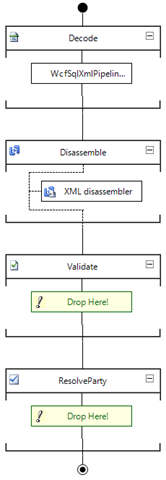
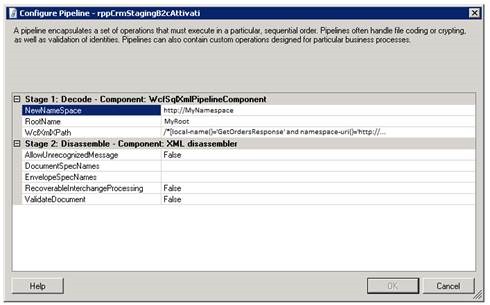
To complete development activities, it is need to create a receive pipeline that includes the custom pipeline component as shown in the following picture.
Port configuration
From the administration console, import the binding file generated from the WCF-SQL adapter wizard during the schema generation.
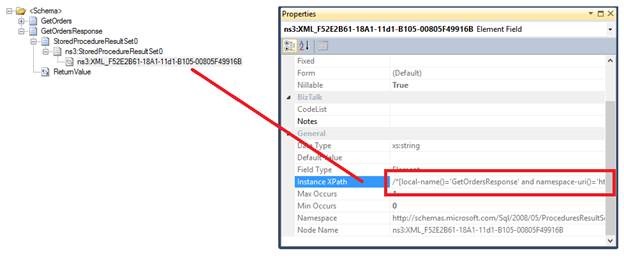
Change the receive pipeline, specifying what developed in the previous chapter. In the property of the receive pipeline, specify the namespace, the root element of the SQL adapter generated schema and the XPath query of the element of the schema WCF-SQL that contains the XML result as shown in the follow.
You can find the XPath query in the WCF-SQL schema.
Source code
Following you can find the custom pipeline component source code.
using System;
using System.Text;
using System.Xml;
using System.IO;
using Microsoft.BizTalk.Message.Interop;
using Microsoft.BizTalk.Component.Interop;
using System.Xml.XPath;
using System.ComponentModel;
using System.Diagnostics;

namespace Sample.CustomPipeline
{
    [ComponentCategory(CategoryTypes.CATID_PipelineComponent)]
    [ComponentCategory(CategoryTypes.CATID_Decoder)]
    [System.Runtime.InteropServices.Guid("9d0e4103-4cce-4536-83fa-4a5040674ad6")]
    public class WcfSqlXmlPipelineComponent : IBaseComponent, IComponentUI, Microsoft.BizTalk.Component.Interop.IComponent, IPersistPropertyBag
    {

        #region properties

        private string wcfXmlXPath;

        [System.ComponentModel.Description("Specify the XPath query of the WCF XML node data.")]
        public string WcfXmlXPath
        {
            get { return wcfXmlXPath; }
            set { wcfXmlXPath = value; }
        }

        private string newNameSpace;

        [System.ComponentModel.Description("Namespace to be assigned.")]
        public string NewNameSpace
        {
            get { return newNameSpace; }
            set { newNameSpace = value; }
        }

        private string rootName;

        [System.ComponentModel.Description("XML Root name to be assigned.")]
        public string RootName
        {
            get { return rootName; }
            set { rootName = value; }
        }

        #endregion

        #region IBaseComponent Members

        [Browsable(false)]
        public string Description
        {
            get
            {
                return "Pipeline component used to return a specific XML SQL statement";
            }
        }

        [Browsable(false)]
        public string Name
        {
            get { return "WcfSqlXmlPipelineComponent"; }
        }

        [Browsable(false)]
        public string Version
        {
            get { return "1.0.0.0"; }
        }

        #endregion

        #region IPersistPropertyBag Members

        public void GetClassID(out Guid classID)
        {
            classID = new Guid("0C86A664-3D33-4E70-99AE-E130D9D8620C");
        }

        public void InitNew()
        {

        }

        public void Load(IPropertyBag pb, int errorLog)
        {

            object val;
            val = ReadPropertyBag(pb, "WcfXmlXPath");
            if ((val != null))
            {
                wcfXmlXPath = ((string)(val));
            }

            val = ReadPropertyBag(pb, "NewNameSpace");
            if ((val != null))
            {
                newNameSpace = ((string)(val));
            }

            val = ReadPropertyBag(pb, "RootName");
            if ((val != null))
            {
                rootName = ((string)(val));
            }
        }

        public void Save(IPropertyBag pb, bool clearDirty, bool saveAllProperties)
        {
            WritePropertyBag(pb, "WcfXmlXPath", WcfXmlXPath);
            WritePropertyBag(pb, "NewNameSpace", NewNameSpace);
            WritePropertyBag(pb, "RootName", RootName);
        }

        #region utility functionality

        /// <summary>
        /// Reads property value from property bag
        /// </summary>
        /// <param name="pb">Property bag</param>
        /// <param name="propName">Name of property</param>
        /// <returns>Value of the property</returns>
        private object ReadPropertyBag(IPropertyBag pb, string propName)
        {
            object val = null;
            try
            {
                pb.Read(propName, out val, 0);
            }
            catch (ArgumentException)
            {
                return val;
            }
            catch (Exception e)
            {
                throw new ApplicationException(e.Message);
            }
            return val;
        }

        /// <summary>
        /// Writes property values into a property bag.
        /// </summary>
        /// <param name="pb">Property bag.</param>
        /// <param name="propName">Name of property.</param>
        /// <param name="val">Value of property.</param>
        private void WritePropertyBag(IPropertyBag pb, string propName, object val)
        {
            try
            {
                pb.Write(propName, ref val);
            }
            catch (Exception e)
            {
                throw new ApplicationException(e.Message);
            }
        }
        #endregion

        #endregion

        #region IComponentUI Members

        /// <summary>
        /// Component icon to use in BizTalk Editor
        /// </summary>
        [Browsable(false)]
        public IntPtr Icon
        {
            get { return new IntPtr(); }
        }

        System.Collections.IEnumerator IComponentUI.Validate(object projectSystem)
        {
            return null;
        }

        #endregion

        #region IComponent Members

        public IBaseMessage Execute(IPipelineContext pContext, IBaseMessage pInMsg)
        {

            string systemPropertiesNamespace = @"http://schemas.microsoft.com/BizTalk/2003/system-properties";
            string messageType = string.Concat(newNameSpace, "#", rootName);
            StringBuilder outMessage = new StringBuilder();

            try
            {

                Debug.Write("Execute started");

                IBaseMessagePart bodyPart = pInMsg.BodyPart;

                if (bodyPart != null)
                {

                    Stream messageInputStream = bodyPart.GetOriginalDataStream();
                    string xmlMessage = ExtractDataValueXPath(messageInputStream, wcfXmlXPath);

                    outMessage.Append(string.Format("<{0}>", rootName));
                    outMessage.Append(xmlMessage);
                    outMessage.Append(string.Concat("</", rootName, ">"));

                    Debug.Write(String.Concat("messageType: ", messageType));
                    Debug.Write(String.Concat("rootName: ", rootName));
                    Debug.Write(String.Concat("wcfXmlXPath: ", wcfXmlXPath));
                    Debug.Write(String.Concat("xmlMessage: ", xmlMessage));

                    byte[] outBytes = System.Text.Encoding.ASCII.GetBytes(outMessage.ToString());

                    MemoryStream memStream = new MemoryStream();
                    memStream.Write(outBytes, 0, outBytes.Length);
                    memStream.Position = 0;
                    bodyPart.Data = memStream;
                    pContext.ResourceTracker.AddResource(memStream);

                }

                pInMsg.Context.Promote("MessageType", systemPropertiesNamespace, messageType);

            }
            catch (Exception exc)
            {
                Debug.Write(exc.Message);
                throw;
            }
            finally
            {
                Debug.Write("Execute finished");
            }

            return pInMsg;

        }

        #endregion

        private string ExtractDataValueXPath(Stream MsgStream, string MsgXPath)
        {

            XmlReaderSettings settings = new XmlReaderSettings()
            {

                ConformanceLevel = ConformanceLevel.Document,
                IgnoreWhitespace = true,
                ValidationType = ValidationType.None,
                IgnoreProcessingInstructions = true,
                IgnoreComments = true,
                CloseInput = false
            };

            MsgStream.Seek(0, SeekOrigin.Begin);
            XmlReader reader = XmlReader.Create(MsgStream, settings);
            StringBuilder strValue = new StringBuilder();

            if (!string.IsNullOrEmpty(MsgXPath))
            {
                if (reader.Read())
                {
                    XPathDocument xPathDoc = new XPathDocument(reader);
                    XPathNavigator xNavigator = xPathDoc.CreateNavigator();
                    XPathNodeIterator xNodes = xNavigator.Select(MsgXPath);
                    while (xNodes.MoveNext())
                    {
                        strValue.Append(xNodes.Current.Value);
                    }
                    MsgStream.Seek(0, SeekOrigin.Begin);
                }
            }

            return strValue.ToString();
        }

    }
}


How do you clear the target namespace from the schema generated with the old SQL adapter? I’ve tried just removing it, but get an error saying “The target namespace of this schema cannot be blank because this schema has a prefix associated with the target namespace”. I’m trying to see where that prefix is defined.
Summarize an example of what I usually do.
Stored Procedure Sample:
SQL Adapter Wizard.
Now I can remove target namespace property and compile successfully.
Thanks. I’m not sure what I did wrong the first day, but I put it aside a couple days and then tried again and I had no issues.
I did go one step farther. I was wondering how we would get the structured schema someday in a future version when the SQL adapter is completely deprecated. I came up with this, which also seems to work. I executed the stored procedure and saved the results as an XML file. Then in the Add Generated Items Wizard, I chose Generate Schemas to generate the schema from a sample XML file.
Thanks so much for your post. It has been extremely helpful.