
A few days ago, during the BizTalk Innovation Day held in Norway, I had the opportunity to meet with several BizTalk developers and speak about the integration with database systems.
Some of them have asked me to send the examples I have shown during the labs.
This article refers to integration with Microsoft SQL Server, but the concept is the same when you use a different platform. I used the same approach integrating Oracle and DB2.
The scenario illustrated in this example is extremely simple; it is an export from a database table to a generic target system.
Database entities
When you integrate a database system, you need to use additional information to maintain the transaction status and other attributes discussed later in this article.
There are two different approaches you can use during database design to add these information. You can extend current entities or implement a separated entity that references the data table.
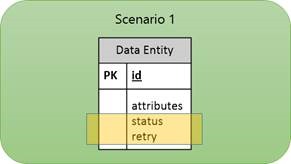
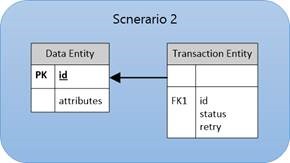
The second one, allow you to delete old transaction maintaining the table small and faster to query. In case you require a transaction history both approach are similar.
For simplicity, we will implement the first scenario.
Following is described the table structure.
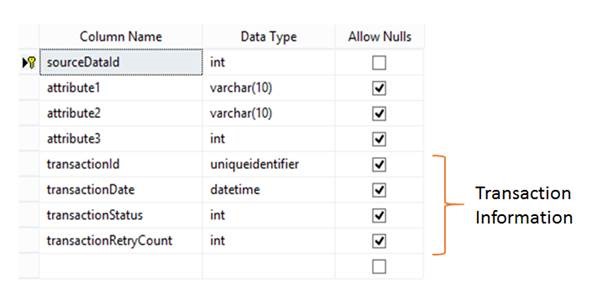
In the following table are detailed all the transaction information fields.
| Field Name | Description |
| transactionId | This field is required during the polling operation to mark uniquely the data set to be processed.
It is very important to use it in scenarios where there are multiple hosts running the BizTalk receive port. |
| transactionDate | Transaction Date |
| transactionStatus | Transaction Status:
· To Process · In Process · Succeded · Succeded with Warnings · Failed (System Failure) · Failed Retry not Allowed (Application managed error) |
| transactionRetryCount | Retry Count: If the integration workflow is particularly complex, it becomes difficult to manage a retry logic directly on the ports.
For this reason I prefer to manually manage on the database side. |
Database Procedures
The figure below shows the approach in general.
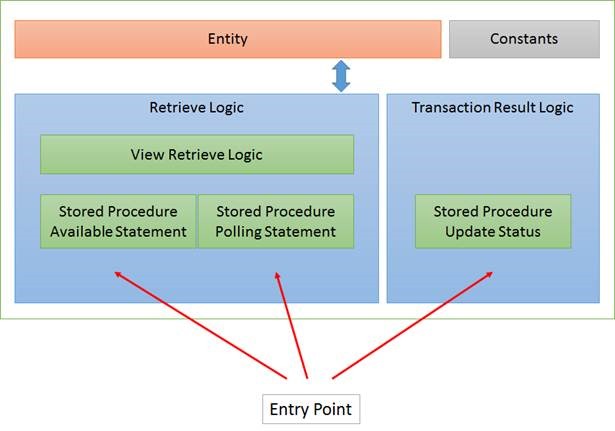
Table Source Code
CREATE TABLE [dbo].[SourceData](
    [sourceDataId] [int] IDENTITY(1,1) NOT NULL,
    [attribute1] [varchar](10) NULL,
    [attribute2] [varchar](10) NULL,
    [attribute3] [int] NULL,
    [transactionId] [uniqueidentifier] NULL,
    [transactionDate] [datetime] NULL,
    [transactionStatus] [int] NULL,
    [transactionRetryCount] [int] NULL,
    CONSTRAINT [PK_SourceData] PRIMARY KEY CLUSTERED
    (
        [sourceDataId] ASC
    )
    WITH (
            PAD_INDEX = OFF,
            STATISTICS_NORECOMPUTE = OFF,
            IGNORE_DUP_KEY = OFF,
            ALLOW_ROW_LOCKS = ON,
            ALLOW_PAGE_LOCKS = ON
        ) ON [PRIMARY]
) ON [PRIMARY]
GO
Constants Definition Source Code
Transaction Status Constants:
CREATE FUNCTION [dbo].[StatusToProcess]()
RETURNS INT
AS
BEGIN
    RETURN 0;
END
GO

CREATE FUNCTION [dbo].[StatusInProcess]()
RETURNS INT
AS
BEGIN
    RETURN 1;
END
GO

CREATE FUNCTION [dbo].[StatusSucceded]()
RETURNS INT
AS
BEGIN
    RETURN 2;
END
GO

CREATE FUNCTION [dbo].[StatusSuccededWithWarnings]()
RETURNS INT
AS
BEGIN
    RETURN 3;
END
GO

CREATE FUNCTION [dbo].[StatusFailed]()
RETURNS INT
AS
BEGIN
    RETURN 4;
END
GO

CREATE FUNCTION [dbo].[StatusFailedRetryNotAllowed]()
RETURNS INT
AS
BEGIN
    RETURN 5;
END
GO
Retry Logic Constants:
CREATE FUNCTION [dbo].[MaxRetryCount]()
RETURNS INT
AS
BEGIN
    RETURN 3;
END
GO

CREATE FUNCTION [dbo].[RetryInterval]()
RETURNS INT
AS
BEGIN
    RETURN 1;
END
GO
Views Source Code
The available statement and the polling statement, have in common the logic that determines which rows are to be processed.
Sometimes it can be quite complex so it is advisable define it into a view just to centralize.
CREATE VIEW [dbo].[SourceDataToProcess] AS

SELECT
    SourceData.sourceDataId

FROM
    SourceData

WHERE
    transactionStatus = dbo.StatusToProcess()
    OR
    (
        transactionStatus = dbo.StatusFailed()
        AND ISNULL(transactionRetryCount, 0) <= dbo.MaxRetryCount()
        AND GETDATE() > DATEADD(MINUTE, dbo.RetryInterval(), ISNULL(transactionDate, '01/01/2000'))
    );
Stored Procedures Source Code
From my point of view, the database is a service, for that reason, the entry point must be implemented exclusively through stored procedures.
Available Statement Procedure:
CREATE PROCEDURE [dbo].[SourceDataAvailableStmt]
AS
BEGIN

    SET NOCOUNT ON;
    SET XACT_ABORT ON;
    SET TRANSACTION ISOLATION LEVEL READ COMMITTED;

    SELECT
        COUNT(*)
    FROM
        SourceDataToProcess;

END
Polling Statement Procedure:
CREATE PROCEDURE [dbo].[SourceDataPollingStmt]
AS
BEGIN

    SET NOCOUNT ON;
    SET XACT_ABORT ON;
    SET TRANSACTION ISOLATION LEVEL READ COMMITTED;

    DECLARE @transactionId UNIQUEIDENTIFIER;

    SET @transactionId = NEWID();

    -- Lock processing records
    UPDATE SourceData
    SET
        transactionId = @transactionId,
        transactionDate = GETDATE(),
        transactionStatus = dbo.StatusInProcess()
    FROM
        SourceData

        INNER JOIN SourceDataToProcess
        ON SourceData.sourceDataId = SourceDataToProcess.sourceDataId;

    -- Return data
    SELECT
        transactionId = CONVERT(CHAR(36), @transactionId),
        sourceDataId,
        attribute1,
        attribute2,
        attribute3

    FROM
        SourceData WITH (NOLOCK)

    WHERE
        transactionId = @transactionId;

END
Update Status Procedure:
This procedure is used to set the final state of the transaction at the end of workflow integration.
CREATE PROCEDURE [dbo].[SourceDataUpdateStatus]
    @sourceDataId INT,
    @transactionStatus INT
AS
BEGIN

    SET NOCOUNT ON;
    SET XACT_ABORT OFF;
    SET TRANSACTION ISOLATION LEVEL READ COMMITTED;

    BEGIN TRY

        UPDATE SourceData
        SET
            transactionStatus = @transactionStatus,
            transactionRetryCount = CASE
                            WHEN @transactionStatus IN (dbo.StatusSucceded(), dbo.StatusSuccededWithWarnings()) THEN transactionRetryCount
                            WHEN @transactionStatus = dbo.StatusFailed() AND ISNULL(transactionRetryCount, 0) < dbo.MaxRetryCount() THEN ISNULL(transactionRetryCount, 0) + 1
                            ELSE 100
                            END,
            transactionDate = GETDATE()
        WHERE
            sourceDataId = @sourceDataId;

    END TRY
    BEGIN CATCH

        DECLARE @ERROR_NUMBER INT;
        DECLARE @ERROR_MESSAGE NVARCHAR(4000);
        DECLARE @ERROR_SEVERITY INT;
        DECLARE @ERROR_STATE INT;
        DECLARE @procedureName SYSNAME;

        SELECT
            @ERROR_NUMBER = ERROR_NUMBER(),
            @ERROR_MESSAGE = ERROR_MESSAGE(),
            @ERROR_SEVERITY = ERROR_SEVERITY(),
            @ERROR_STATE = ERROR_STATE(),
            @procedureName = ISNULL('Sql Procedure: "' + DB_NAME() + '.' + OBJECT_SCHEMA_NAME(@@PROCID) + '.' + OBJECT_NAME(@@PROCID) + '". ', '');

        SET @ERROR_MESSAGE = @procedureName + ' Error Detail: ' + @ERROR_MESSAGE;
        RAISERROR(@ERROR_MESSAGE, @ERROR_SEVERITY, @ERROR_STATE);

    END CATCH

END
BizTalk Process
The following figure shows the integration process.
![clip_image002[5]](https://pellitteris.net/wp-content/uploads/2013/10/clip_image0025.jpg "clip_image002[5]")
The transaction result status is initialized to “Success”. In the case in which an error occurs it will set to “Failed”.

