
At this moment, the Azure portal does not allow the creation of a Service Bus namespace in a specific Resource Group. You can do it via REST or PowerShell but not from the portal.
In this short article, I will show how to do it without writing lines of code.
- Create the resource group from the portal (for example “sampleResources”)
- From https://resources.azure.com app navigate “subscription”, “your subscription name”, “resourceGroups” and then choose the resource group previously created.
- Expand “providers” and click on “Show all”
- Expand “Microsoft.ServiceBus” and then select “namespaces”
- On the right panel click on “Read\Write” and then on “Create” buttons
- Specify the name of your Service Bus Namespace (for example “sampleServiceBus”)
- Paste the following json code
| { “id”: “/subscriptions/SUBSCRIPTION_GUID/resourceGroups/sampleResources/providers/Microsoft.ServiceBus/namespaces/sampleServiceBus“, “name”: “sampleServiceBus“, “type”: “Microsoft.ServiceBus/namespaces”, “location”: “West US“, “kind”: “Messaging”, “tags”: {}, “properties”: { “provisioningState”: “Succeeded”, “status”: “Active”, “createdAt”: “2016-05-10T12:00:00.000Z”, “serviceBusEndpoint”: “https://sampleServiceBus.servicebus.windows.net:443/”, “enabled”: true, “critical”: false, “updatedAt”: “2016-05-10T12:00:00.000Z”, “eventHubEnabled”: true, “namespaceType”: “Messaging”, “messagingSku”: 2 } } |
You should have the following
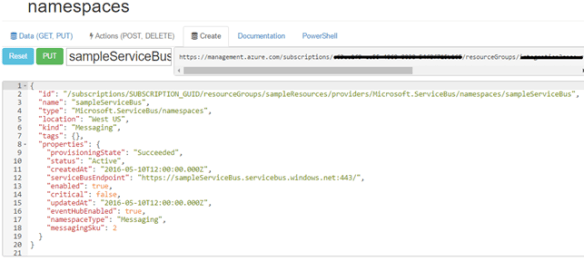
- Click on “PUT” button and that’s it!
 Salvatore Pellitteri's Integration Blog
I am getting an error in parsing JSON when I paste this
I think now this article is no longer valid. For some months, you can use the Azure portal to create a Service Bus namespace in a specific resource group.