
If you have a BizTalk Server 2013 installed on Windows Server 2012 and configure receive or send ports that access to third-party NAS via UNC paths, you may receive the error code 0x80004005.
In this scenario, only one Windows process at a time is able to access to the remote share, the other processes will fail.
Therefore, the problem exists if multiple receive or send ports are configured on different BizTalk hosts.
In addition, if you enable the ports, trying to access the remote share from Windows Explorer you will get the following error:
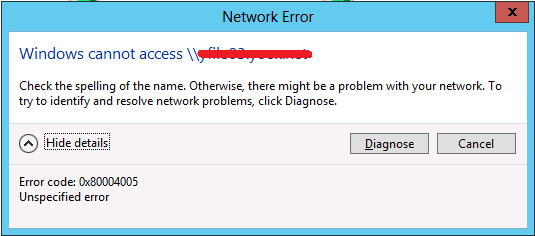
The problem is not related to BizTalk layer, but to Windows Server 2012-based or Windows 8-based computer that fail to connect to a third-party file server that supports the SMBv2 file protocol. In fact, you can reproduce the problem following the step below:
· Log on with a first user to Windows Server 2012;
· Log on with a second user to the same machine;
· Both users should try to map a network drive specifying the same remote folder;
· The second user should get the error.
At this moment, to allow the ports configured on multiple BizTalk hosts to works fine, you have to disable SMBv2 and SMBv3 protocol forcing the communications on SMBv1.
To do that execute the following commands:
|
sc.exe config lanmanworkstation depend= bowser/mrxsmb10/nsi sc.exe config mrxsmb20 start= disabled
|
Additional information on how to enable and disable Server Message Block (SMB) version 2 (SMBv2) and SMB version 3 (SMBv3) on the SMB client and server components, can be found at this address http://support.microsoft.com/kb/2696547.
Remember that SMBv1 must be configured in order to works correctly with BizTalk server environments.
By default with SMBv1 are allowed just 50 client connections and 265 server connections. Typically these value are not compatible with integration scenarios.
So you have to modify the following registry settings in order to grow the number of concurrent sessions.
Registry Key:
HKEY_LOCAL_MACHINE\SYSTEM\CurrentControlSet\Services\LanmanWorkstation\Parameters
Parameter:
MaxCmds (DWORD)
Possible values: 1-65535
Default Value: 50
Example Value: 16384
Registry Key:
HKEY_LOCAL_MACHINE\SYSTEM\CurrentControlSet\Services\LanmanServer\Parameters
Parameter:
MaxMpxCt (DWORD)
Possible values: 1-65535
Example Value: 4096
Parameter:
MaxWorkItems (DWORD)
Possible values: 1-65535
Example Value: 16384 (Should be at least MaxMpxCt * 4)


Only NTFS Files systems are supported. Although you found a work around, this is not a valid configuration.
What Is the File Adapter?
http://msdn.microsoft.com/en-us/library/aa559685.aspx
“The BizTalk Server File adapter has only been tested on, and is supported on, the NTFS file system.”
Your remote file system is not NTFS…
In this specific case, I got the problem with a Hitachi NAS that has an NTFS file system (http://www.hitachi.com/rev/archive/2008/__icsFiles/afieldfile/2008/04/24/r2008_02_104.pdf). Same version of BizTalk installed on Windows 2008 R2 does not have the problem.